I2C-Master Core
Revision History
Re v. |
Date |
Author |
Description |
0 .1 |
17 /02/01 |
Richard Herveille |
First draft release |
0 .2 |
01 /03/01 |
Richard Herveille |
Some cleaning up throughout the document Added ‘Programming Examples’ section |
0 .3 |
Richard Herveille |
Added some comments after core-changes
|
|
0 .4 |
10 /19/01 |
Richard Herveille |
Changed core’s databus size to 8bit. Changed documentation to reflect changes. Changed port names to new naming convention. |
0 .5 |
18 /02/02 |
Richard Herveille |
Changed table headers. Added OpenCores logo. |
0. 5a |
05 /02/02 |
Richard Herveille |
Reviewed entire document. |
0 .6 |
21 /03/02 |
Richard Herveille |
Added Appendix A, Synthesis Results |
0 .7 |
25 /06/02 |
Richard Herveille |
Changed Prescale Register formula |
0 .8 |
30 /12/02 |
Richard Herveille |
Added Multi-Master capabilities. New timing diagrams. |
0 .9 |
03 /07/03 |
Richard Herveille |
Changed ‘0x5C’ to ‘0xAC’ in Example1. Changed ‘RW’ to ‘W’ in Command Register. Changed ‘RW’ to ‘W’ in Transmit Register. |
Introduction
I2C is a two-wire, bi-directional serial bus that provides a simple and efficient method of data exchange between devices. It is most suitable for applications requiring occasional communication over a short distance between many devices. The I2C standard is a true multi-master bus including collision detection and arbitration that prevents data corruption if two or more masters attempt to control the bus simultaneously.
The interface defines 3 transmission speeds:
Normal: 100Kbps
Fast: 400Kbps
High speed: 3.5Mbps
Only 100Kbps and 400Kbps modes are supported directly. For High speed special IOs are needed. If these IOs are available and used, then High speed is also supported.
FEATURES
Compatible with Philips I2C standard
Multi Master Operation
Software programmable clock frequency
Clock Stretching and Wait state generation
Software programmable acknowledge bit
Interrupt or bit-polling driven byte-by-byte data-transfers
Arbitration lost interrupt, with automatic transfer cancelation
Start/Stop/Repeated Start/Acknowledge generation
Start/Stop/Repeated Start detection
Bus busy detection
Supports 7 and 10bit addressing mode
Operates from a wide range of input clock frequencies
Static synchronous design
Fully synthesizable
IO ports
Core Parameters
Parameter |
Type |
Default |
Description |
ARST_LVL |
Bit |
1’b0 |
Asynchronous reset level |
ARST_LVL
The asynchronous reset level can be set to either active high (1’b1) or active low (1’b0).
WISHBONE interface signals
The core features a WISHBONE RevB.3 compliant WISHBONE Classic interface. All output signals are registered. Each access takes 2 clock cycles.
arst_i is not a WISHBONE compatible signal. It is provided for FPGA implementations. Using [arst_i] instead of [wb_rst_i] can result in lower cell-usage and higher performance, because most FPGAs provide a dedicated asynchronous reset path. Use either [arst_i] or [wb_rst_i], tie the other to a negated state.
External connections
Port |
Width |
Direction |
Description |
scl_pad_i |
1 |
Input |
Serial Clock line input |
scl_pad_o |
1 |
Output |
Serial Clock line output |
scl_pad_oe |
1 |
Output |
Serial Clock line output enable |
sda_pad_i |
1 |
Input |
Serial Data line input |
sda_pad_o |
1 |
Output |
Serial Data line output |
sda_pad_oe |
1 |
Output |
Serial Data line output enable |
The IC interface uses a serial data line (SDA) and a serial clock line (SCL) for data transfers. All devices connected to these two signals must have open drain or open collector outputs. Both lines must be pulled-up to VCC by external resistors.
The tri-state buffers for the SCL and SDA lines must be added at a higher hierarchical level. Connections should be made according to the figure:
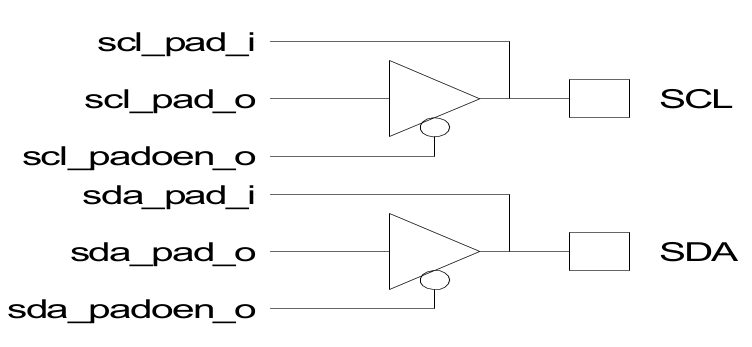
Fig. 12 Tri-state buffer connection
For FPGA designs the compiler can automatically insert these buffers using the following VHDL code:
scl <= scl_pad_o when (scl_padoen_oe = ‘0’) else ‘Z’;
sda <= sda_pad_o when (sda_padoen_oe = ‘0’) else ‘Z’;
scl_pad_i <= scl;
scl_pad_i <= sda;
Verilog code:
assign scl = scl_padoen_oe ? 1’bz : scl_pad_o;
assign sda = sda_padoen_oe ? 1’bz: sda_pad_o;
assign scl_pad_i = scl;
assign sda_pad_i = sda;
Registers
Registers list
Name |
Address |
Width |
Access |
Description |
PRERlo |
0x00 |
8 |
RW |
Clock Prescale register lo-byte |
PRERhi |
0x01 |
8 |
RW |
Clock Prescale register hi-byte |
CTR |
0x02 |
8 |
RW |
Control register |
TXR |
0x03 |
8 |
W |
Transmit register |
RXR |
0x03 |
8 |
R |
Receive register |
CR |
0x04 |
8 |
W |
Command register |
SR |
0x04 |
8 |
R |
Status register |
Register description
Prescale Register
This register is used to prescale the SCL clock line. Due to the structure of the I2C interface, the core uses a 5*SCL clock internally. The prescale register must be programmed to this 5*SCL frequency (minus 1). Change the value of the prescale register only when the ‘EN’ bit is cleared.
Example: wb_clk_i = 32MHz, desired SCL = 100KHz
prescale = 32 MHz / (5*100 KHz) - 1 = 63 (dec) = 3F (hex)
Reset value: 0xFFFF
Control register
Reset Value: 0x00
The core responds to new commands only when the ‘EN’ bit is set. Pending commands are finished. Clear the ‘EN’ bit only when no transfer is in progress, i.e. after a STOP command, or when the command register has the STO bit set. When halted during a transfer, the core can hang the I2C bus.
Transmit register
Bit# |
Access |
Description |
7:1 |
W |
Next byte to transmit via I2C |
0 |
W |
In case of a data transfer this bit represent the data’s LSB. In case of a slave address transfer this bit represents the RW bit. ‘1’ = reading from slave ‘0’ = writing to slave |
Reset value: 0x00
Receive register
Bit# |
Access |
Description |
7:0 |
R |
Last byte received via I2C |
Reset value: 0x00
Command register
Reset Value: 0x00
The STA, STO, RD, WR, and IACK bits are cleared automatically. These bits are always read as zeros.
Status register
Reset Value: 0x00
Please note that all reserved bits are read as zeros. To ensure forward compatibility, they should be written as zeros.
Operation
System Configuration
The I2C system uses a serial data line (SDA) and a serial clock line (SCL) for data transfers. All devices connected to these two signals must have open drain or open collector outputs. The logic AND function is exercised on both lines with external pull-up resistors.
Data is transferred between a Master and a Slave synchronously to SCL on the SDA line on a byte-by-byte basis. Each data byte is 8 bits long. There is one SCL clock pulse for each data bit with the MSB being transmitted first. An acknowledge bit follows each transferred byte. Each bit is sampled during the high period of SCL; therefore, the SDA line may be changed only during the low period of SCL and must be held stable during the high period of SCL. A transition on the SDA line while SCL is high is interpreted as a command (see START and STOP signals).
I2C Protocol
Normally, a standard communication consists of four parts:
START signal generation
Slave address transfer
Data transfer
STOP signal generation

Fig. 13 I2C waveform
START signal
When the bus is free/idle, meaning no master device is engaging the bus (both SCL and SDA lines are high), a master can initiate a transfer by sending a START signal. A START signal, usually referred to as the S-bit, is defined as a high-to-low transition of SDA while SCL is high. The START signal denotes the beginning of a new data transfer.
A Repeated START is a START signal without first generating a STOP signal. The master uses this method to communicate with another slave or the same slave in a different transfer direction (e.g. from writing to a device to reading from a device) without releasing the bus.
The core generates a START signal when the STA-bit in the Command Register is set and the RD or WR bits are set. Depending on the current status of the SCL line, a START or Repeated START is generated.
Slave Address Transfer
The first byte of data transferred by the master immediately after the START signal is the slave address. This is a seven-bits calling address followed by a RW bit. The RW bit signals the slave the data transfer direction. No two slaves in the system can have the same address. Only the slave with an address that matches the one transmitted by the master will respond by returning an acknowledge bit by pulling the SDA low at the 9th SCL clock cycle.
Note: The core supports 10bit slave addresses by generating two address transfers. See the Philips I2C specifications for more details.
The core treats a Slave Address Transfer as any other write action. Store the slave device’s address in the Transmit Register and set the WR bit. The core will then transfer the slave address on the bus.
Data Transfer
Once successful slave addressing has been achieved, the data transfer can proceed on a byte-by-byte basis in the direction specified by the RW bit sent by the master. Each transferred byte is followed by an acknowledge bit on the 9th SCL clock cycle. If the slave signals a No Acknowledge, the master can generate a STOP signal to abort the data transfer or generate a Repeated START signal and start a new transfer cycle.
If the master, as the receiving device, does not acknowledge the slave, the slave releases the SDA line for the master to generate a STOP or Repeated START signal.
To write data to a slave, store the data to be transmitted in the Transmit Register and set the WR bit. To read data from a slave, set the RD bit. During a transfer the core set the TIP flag, indicating that a Transfer is In Progress. When the transfer is done the TIP flag is reset, the IF flag set and, when enabled, an interrupt generated. The Receive Register contains valid data after the IF flag has been set. The user may issue a new write or read command when the TIP flag is reset.
STOP signal
The master can terminate the communication by generating a STOP signal. A STOP signal, usually referred to as the P-bit, is defined as a low-to-high transition of SDA while SCL is at logical ‘1’.
Arbitration Procedure
Clock Synchronization
The I2C bus is a true multimaster bus that allows more than one master to be connected on it. If two or more masters simultaneously try to control the bus, a clock synchronization procedure determines the bus clock. Because of the wired-AND connection of the I2C signals a high to low transition affects all devices connected to the bus. Therefore a high to low transition on the SCL line causes all concerned devices to count off their low period. Once a device clock has gone low it will hold the SCL line in that state until the clock high state is reached. Due to the wired-AND connection the SCL line will therefore be held low by the device with the longest low period, and held high by the device with the shortest high period.

Fig. 14 Clock synchronization
Clock Stretching
Slave devices can use the clock synchronization mechanism to slow down the transfer bit rate. After the master has driven SCL low, the slave can drive SCL low for the required period and then release it. If the slave’s SCL low period is greater than the master’s SCL low period, the resulting SCL bus signal low period is stretched, thus inserting wait-states.
Architecture
The I2C core is built around four primary blocks; the Clock Generator, the Byte Command Controller, the Bit Command Controller and the DataIO Shift Register.
All other blocks are used for interfacing or for storing temporary values.

Fig. 15 Internal structure of I2C master core
Clock Generator
The Clock Generator generates an internal 4*Fscl clock enable signal that triggers all synchronous elements in the Bit Command Controller. It also handles clock stretching needed by some slaves.
Byte Command Controller
The Byte Command Controller handles I2C traffic at the byte level. It takes data from the Command Register and translates it into sequences based on the transmission of a single byte. By setting the START, STOP, and READ bit in the Command Register, for example, the Byte Command Controller generates a sequence that results in the generation of a START signal, the reading of a byte from the slave device, and the generation of a STOP signal. It does this by dividing each byte operation into separate bit-operations, which are then sent to the Bit Command Controller.

Fig. 16 Bit command controller flow chart
Bit Command Controller
The Bit Command Controller handles the actual transmission of data and the generation of the specific levels for START, Repeated START, and STOP signals by controlling the SCL and SDA lines. The Byte Command Controller tells the Bit Command Controller which operation has to be performed. For a single byte read, the Bit Command Controller receives 8 separate read commands. Each bit-operation is divided into 5 pieces (idle and A, B, C, and D), except for a STOP operation which is divided into 4 pieces (idle and A, B, and C).

Fig. 17 Bit command controller waveform
DataIO Shift Register
The DataIO Shift Register contains the data associated with the current transfer. During a read action, data is shifted in from the SDA line. After a byte has been read the contents are copied into the Receive Register. During a write action, the Transmit Register’s contents are copied into the DataIO Shift Register and are then transmitted onto the SDA line.
Programming examples
Example 1
Write 1 byte of data to a slave.
Slave address = 0x51 (b”1010001”)
Data to write = 0xAC
I2C Sequence:
generate start command
write slave address + write bit
receive acknowledge from slave
write data
receive acknowledge from slave
generate stop command
Commands:
write 0xA2 (address + write bit) to Transmit Register, set STA bit, set WR bit.
– wait for interrupt or TIP flag to negate –
read RxACK bit from Status Register, should be ‘0’.
write 0xAC to Transmit register, set STO bit, set WR bit.
– wait for interrupt or TIP flag to negate –
read RxACK bit from Status Register, should be ‘0’.

Fig. 18 Waveform of program example 1
Note
Please note that the time for the Interrupt Service Routine is not shown here. It is assumed that the ISR is much faster then the I2C cycle time, and therefore not visible.
Example 2
Read a byte of data from an I2C memory device.
Slave address = 0x4E
Memory location to read from = 0x20
I2C sequence:
generate start signal
write slave address + write bit
receive acknowledge from slave
write memory location
receive acknowledge from slave
generate repeated start signal
write slave address + read bit
receive acknowledge from slave
read byte from slave
write no acknowledge (NACK) to slave, indicating end of transfer
generate stop signal
Commands:
write 0x9C (address + write bit) to Transmit Register, set STA bit, set WR bit.
– wait for interrupt or TIP flag to negate –
read RxACK bit from Status Register, should be ‘0’.
write 0x20 to Transmit register, set WR bit.
– wait for interrupt or TIP flag to negate –
read RxACK bit from Status Register, should be ‘0’.
write 0x9D (address + read bit) to Transmit Register, set STA bit, set WR bit.
– wait for interrupt or TIP flag to negate –
set RD bit, set ACK to ‘1’ (NACK), set STO bit
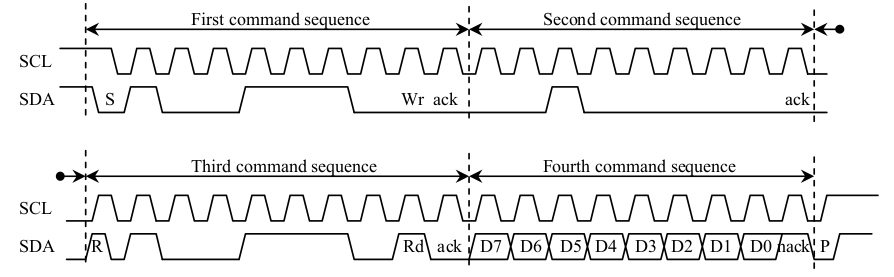
Fig. 19 Waveform of program example 2
Note
Please note that the time for the Interrupt Service Routine is not shown here. It is assumed that the ISR is much faster then the I2C cycle time, and therefore not visible.
Appendix A
Synthesis results
Synthesis tool: Synplify Pro
Technology |
Device |
Speed grade |
Fmax |
Resource usage |
ACTEL |
A54SX16ATQ100 |
std |
58MHz |
Modules: 352 |
Altera |
EP10K50ETC144 |
-3 |
82MHz |
LCs: 294 |
EP20K30ETC144 |
-3 |
74MHz |
ATOMS: 257 |
|
Xilinx |
2s15CS144 |
-5 |
82MHz |
LUTs: 229 |
XCV50ECS144 |
-8 |
118MHz |
LUTs: 230 |